



Sell sponsored spots on your directory's pages.
Members pay to be shown first on a county, city, state or category page. You choose the pages, the levels and the prices, and members buy their spot on their own.
Built for owners of Brilliant Directories sites who want income from the pages their members already show up on.
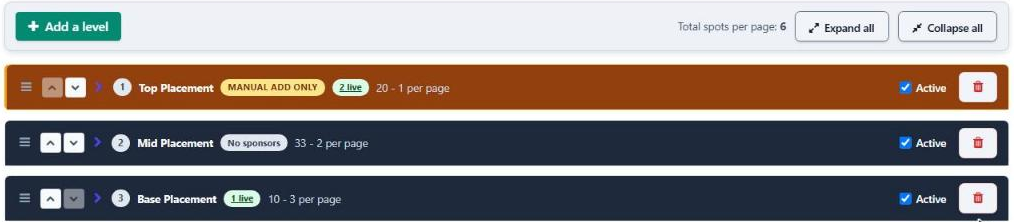
Each level has its own price and number of spots
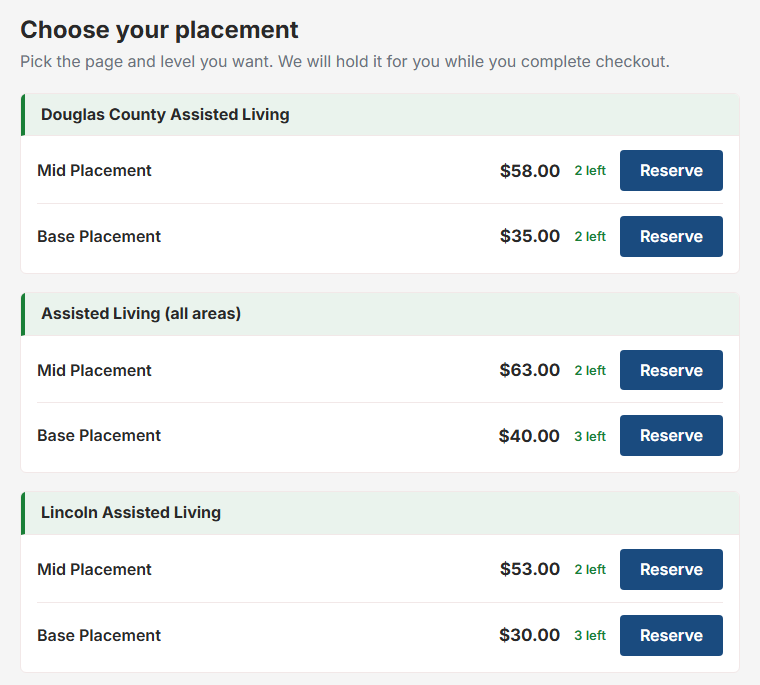
What a member sees when they shop for a spot.
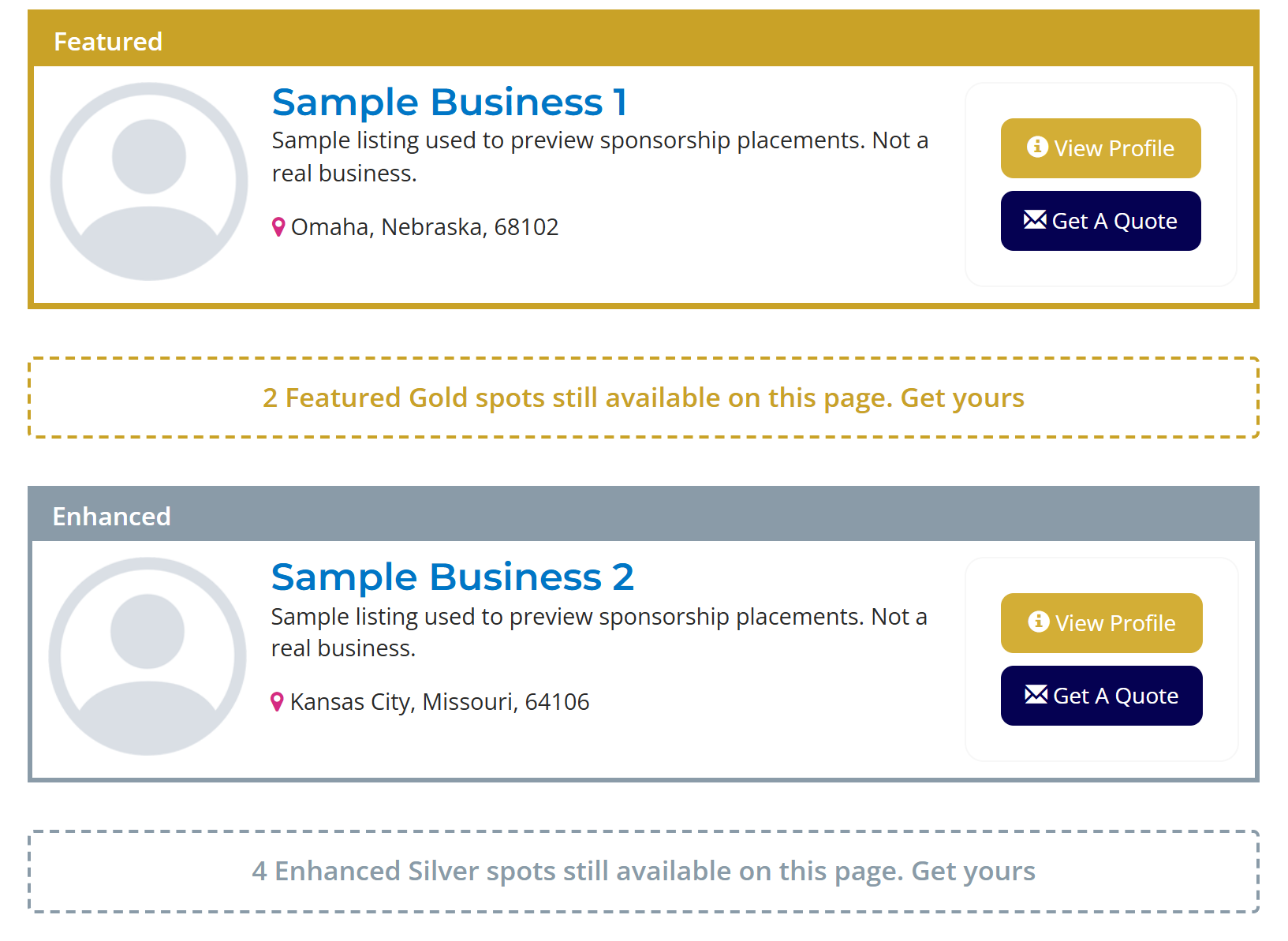
The board shows every page with the spots left at each level and the price. Each page you sell shows how many places are still open, with a button to sponsor it, and its sponsors show first in their level's own color.

Your pages become something members can buy.
A sponsor pays to be shown first on a page you choose, at a level you price.
Income from pages you already have
Sell spots on county, city, state and category pages, or one category within a county, each with its own price.
Members buy on their own
They pick a page and a level, and the spot is held for a few minutes while they check out. No invoices to chase.
Spots that run out
Each level has a set number of spots per page. When a level is full it stops selling, so a top spot stays rare.
Pages made for you
Get suggested pages from where your members are listed, then create county pages with a button or customize pages you already have to sell sponsorships.
Monthly or one-time
A monthly sponsor stays up while they pay and ends on the date they paid through. A late payment ends nothing.
Included with a plan, if you like
Give a membership plan some placements at no extra charge, and approve each one yourself or let them go live.
Sponsors that stand out everywhere.
On a site that runs our other plugins, your sponsors carry their look into them too.


Cards that glow
Each sponsor level gets its own effect, such as a glow or a shimmer, an icon before the label, and a lift when a visitor points at the card.


A Sponsor badge beside each name
Each sponsor gets a small badge beside their name, in your Verified Badge colors, so visitors see at a glance who sponsors the page.


Sponsors first in search
When a visitor searches or filters, the members who sponsor that page come first, and their result cards carry the same highlight, label and Sponsor badge.
Search Order puts sponsors on top
Set the order members appear in your directory search, and add sponsor position as one of the sorts, so the members who sponsor a page come first.
Out of the box, the order of the results comes from the membership plan.
Brilliant Directories can rank search results by each plan's search priority. A higher plan ranks higher on every search across the whole site at once, so the business that wants the top of one county has to buy the top of all of them.
DirectorySponsor sells the top of one page at a time. Each county, city, state or category page gets its own levels, its own prices and its own limit on paid spots, and members buy them at your checkout. Every setup below runs on a directory today, with the steps to build it in your own panel.
County pages for sale
Each county has its own page listing the businesses that serve it, with how many sponsored spots are left at each level. A Sponsor this page button takes a business straight to the picker, where the spot is held while they pay.
Build it
- On the Pages tab, press Add recommended pages and pick the counties your members are listed in.
- Press Create this page on each one to add the county's member listing to your site.
- Under What a new page gets, add the availability board under the member listing.
- In the Settings tab, under Area Picker, turn on the placement picker.
Levels that match your plans
Every county page sells the same ladder: a top level limited to 3 sponsors, a middle level limited to 5, and a standard level with no limit. Each level has its own monthly price, so a business picks how far up the page it wants to sit.
Build it
- On the Levels tab, open Quick Setup Options and make one level for every membership plan.
- Give each level its own name and price, and set its spots per page.
- Set Most placements on one page if paid spots should never crowd out the rest.
Sponsors stand out in the results
Sponsors show first on the page they sponsor. Top-level sponsors carry a gold border and a Featured label, the middle level a silver border and an Enhanced label, so visitors can see who is sponsoring.
Build it
- On the Levels tab, open a level and turn on Highlight sponsored listings.
- Pick the border color, the label text and where the label sits.
- To move sponsors to the top of member search results too, add a Sponsors of the page being searched rule in Search Order.
A spot included with each plan
Each membership plan includes one spot at its own level. A member picks the county page they want without paying, the request waits for the owner, and the member shows on that page once it is approved.
Build it
- On the Included tab, add each plan and pick its level.
- Choose where it applies: any page, or one page only.
- In the Settings tab, under Buying a spot, turn on Approve each included placement yourself.
- Approve each request on the Current Sponsors tab with Record this placement.
A sponsor pitch beside the search results
Member search results show a Sponsorships on this page box beside the listings, with the page's sponsors, a few lines on what sponsoring gets a business, and a button to the owner's sponsorship page.
Build it
- In your site admin, open Toolbox then Sidebar Manager and choose the sidebar your member search results use.
- Add the code shown in setup step 10 and save.
- On the Pages tab, choose how far sponsors reach under Sponsors on search result pages.
Sponsors manage their own
A sponsor sees each sponsorship on their dashboard with its status and renewal date, and can move it to another page, manage billing or cancel without writing to the owner.
Build it
- In the Settings tab, choose where under Show members their sponsorships.
- Or paste the code from setup step 12 into the dashboard content of each plan.
Set it up in the panel you already use.
Everything lives in DirectoryCustomize under My Widgets, and the setup steps tick themselves off as you go.
Run down your checklist.
The things buyers compare when they choose a sponsorship plugin. DirectorySponsor does all of these.
-
County, city, state and category pagesSell spots on any of them, or on one category within a county.
-
Levels with their own priceEach level has its own price and its own number of spots per page.
-
A highlight for each levelEach level can give its sponsors their own border color and a label, such as Featured.
-
A cap on paid spots per pagePaid spots never crowd out the listings people came to see.
-
Members buy on their ownThey pick a page and a level and pay at your own checkout.
-
The spot is held during checkoutA reserved spot is kept for a few minutes while the member pays.
-
An availability boardEvery page with the spots left at each level and the price.
-
Monthly or one-time sponsorshipsMonthly runs while they pay; one-time lasts the months you set.
-
Ends on the paid-through dateA canceled sponsor stays up until the date they paid through.
-
Approval when you want itFor spots outside a member's own listing, or spots a plan includes.
-
Placements included with a planGive a membership plan some spots at no extra charge.
-
Suggested pages from your membersPages for the categories, cities and states your members are listed in.
-
Pages created with one buttonCreate county pages, or customize pages you already have to sell sponsorships.
-
Members matched to their countyMembers show on the right county page from their address.
-
Sponsors on member search resultsA page's sponsors show on matching searches, at the top if you like.
-
A dashboard panel for sponsorsStatus and renewal date, with buttons to move, manage billing or cancel.
A sponsor shop you run yourself.
Built for owners who want sponsors to buy, pay and renew without a request in their inbox each time.
Every new version, on every plan
Updates arrive on their own through DirectoryCustomize. Nothing to reinstall.
Kept working as BD changes
When Brilliant Directories updates its code, we update the plugin to match.
Members pay without you
Picking a spot, paying and the confirmation email all happen without you.
Checkout products made for you
One product per price, made and kept up to date, and old ones switched off.
Spots that really run out
A set number of spots per level on each page, and a full level stops selling.
Pages built and checked for you
Suggested from your members, created with a button, and checked so a missing page stops selling.
Sponsors manage their own
Each sponsor can move to another page, manage billing or cancel from their dashboard.
Set it up yourself
Change levels, prices and pages any time from the settings panel. No developer needed.
Help when something breaks
Technical issues with the plugin are covered for as long as you have it.
Monthly, yearly or a one-time fee.
Pick the way you would rather pay. All three get every new version.
Month to month
Monthly
$20
Per month, cancel any time
- Every feature and every new version.
- Stop whenever you like.
Two months free
RecommendedYearly
$200
Per year
- Every feature and every new version.
- $40 less than paying monthly.
Yours to keep
One-time
$640
Once, no renewal
- Every feature and every new version, for good.
- No bill after the first.
Technical issues with the plugin are covered on every plan. Other help and changes are billed at our normal rates.
One price covers the whole sponsor engine.
- Spots on county, city, state and category pages, with a cap per page you set.
- Levels with their own price and their own number of spots per page.
- Members buy, move and cancel on their own, with the availability board built in.
- Every new version, kept working as Brilliant Directories changes.
The short answers.
Do sponsors pay through my own site?
What can a sponsor buy?
Can I limit how many sponsors a page gets?
What happens when a sponsor stops paying?
Can I approve sponsors before they go live?
What is the difference between the three plans?
Turn your pages into sponsor income.
Questions about setting it up? The help pages walk through every setting, or send us a message.